
asyncio と aiohttp を使用して非同期 HTTP リクエストを実行するライブラリ「asyhttp」のインストールについて解説しています。
「asyhttp(https://github.com/ax/asyhttp)」は、asyncio と aiohttp を使用し非同期 HTTP リクエストを実行する単純なモジュールを提供しています。
■Python

今回のPythonのバージョンは、「3.8.5」を使用しています。(Windows10)(pythonランチャーでの確認)
■asyhttpをインストールする
asyhttpをインストールを行いますが、今回はpipを経由してインストールを行うので、まずWindowsのコマンドプロンプトを起動します。
pip install asyhttp
起動後、上記のコマンドを入力し、Enterキーを押します。
なお、今回は、pythonランチャーを使用しており、Python Version 3.8.5にインストールを行うために、バージョンの切り替えを行います。
py -3.8 -m pip install asyhttp
切り替えるために、上記のコマンドを入力し、Enterキーを押します。
Defaulting to user installation because normal site-packages is not writeable
Collecting asyhttp
  Using cached asyhttp-0.2.tar.gz (3.6 kB)
  Preparing metadata (setup.py) ... error
  error: subprocess-exited-with-error

  × python setup.py egg_info did not run successfully.
  │ exit code: 1
  ╰─> [6 lines of output]
      Traceback (most recent call last):
        File "", line 2, in
        File "", line 34, in
        File "C:\Users\user_\AppData\Local\Temp\pip-install-qzqh5nhl\asyhttp_db69d20dfd544f85a7ef09e5081c30f0\setup.py", line 4, in
          long_description = fh.read()
      UnicodeDecodeError: 'cp932' codec can't decode byte 0x93 in position 843: illegal multibyte sequence
      [end of output]

  note: This error originates from a subprocess, and is likely not a problem with pip.
error: metadata-generation-failed

× Encountered error while generating package metadata.
╰─> See above for output.

note: This is an issue with the package mentioned above, not pip.
hint: See above for details.

[notice] A new release of pip available: 22.2.2 -> 22.3.1
[notice] To update, run: C:\Program Files\Python38\python.exe -m pip install --upgrade pip
Enterキーを押すと、インストールが開始されましたが、「error: subprocess-exited-with-error」というエラーが出力されてしまいました。エラーの原因を調べて対処します。
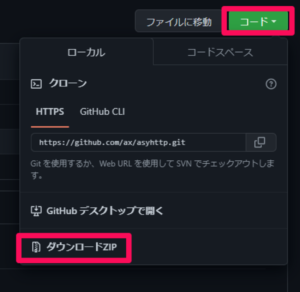
エラーを出力後、対処として、ローカル上にパッケージを一度ダウンロードすることにしますので、https://github.com/ax/asyhttpにアクセスし、緑色の「コード」ボタンから「ダウンロードZIP」をクリックします。クリックすると、Webブラウザで指定されたファイルの保存場所にZIP形式のファイルがダウンロードされます。
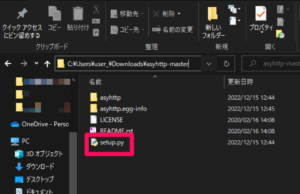
ダウンロード後、「asyhttp-master.zip」を解凍、展開します。解凍・展開後、「asyhttp-master」の「setup.py」を編集します。
■コード(変更前)
from distutils.core import setup

with open("README.rst", "r") as fh:
    long_description = fh.read()

setup(
  name = 'asyhttp',
  packages = ['asyhttp'],
  version = '0.2',
  description = 'Simple module to perform asynchronous HTTP requests using asyncio and aiohttp',
  long_description=long_description,
  author = 'ax',
  author_email = 'ax.tryin@gmail.com',
  url = 'https://github.com/ax/asyhttp',
  download_url = 'https://github.com/ax/asyhttp/archive/0.1.tar.gz',
  keywords = ['aiohttp','asyncio','http','async','asynchronous','http-requests']
)
■コード(変更後)
from distutils.core import setup

with open("README.rst", "r", encoding='UTF-8') as fh:
    long_description = fh.read()

setup(
  name = 'asyhttp',
  packages = ['asyhttp'],
  version = '0.2',
  description = 'Simple module to perform asynchronous HTTP requests using asyncio and aiohttp',
  long_description=long_description,
  author = 'ax',
  author_email = 'ax.tryin@gmail.com',
  url = 'https://github.com/ax/asyhttp',
  download_url = 'https://github.com/ax/asyhttp/archive/0.1.tar.gz',
  keywords = ['aiohttp','asyncio','http','async','asynchronous','http-requests']
)
変更内容は上記になります。変更後、保存し、再度コマンドプロンプトを起動します。
py -3.8 -m pip install -e C:\Users\(ユーザー名)\Downloads\asyhttp-master
起動後、上記のコマンドを入力し、Enterキーを押します。これでローカル上に置かれているパッケージをインストールすることができます。
C:\Users\user_>py -3.8 -m pip install -e C:\Users\user_\Downloads\asyhttp-master
Defaulting to user installation because normal site-packages is not writeable
Obtaining file:///C:/Users/user_/Downloads/asyhttp-master
  Preparing metadata (setup.py) ... done
Installing collected packages: asyhttp
  Running setup.py develop for asyhttp
Successfully installed asyhttp-0.2

[notice] A new release of pip available: 22.2.2 -> 22.3.1
[notice] To update, run: C:\Program Files\Python38\python.exe -m pip install --upgrade pip
Enterキーを押すと、インストールが開始され、上記のように「Successfully installed」と表示されます。これが表示されれば、asyhttpが正常にインストールされたことになります。
なお、今回はasyhttpのバージョン0.2をインストールしました。

コメント